A professional resume is more than just a paper. It is your first chance to introduce yourself to a recruiter, hiring manager, or company that could be part of your career. Before you have an interview, your resume represents you. That is why picking the right resume template is an important step when applying for a job.
A good resume template helps arrange your information clearly, professionally, and in an appealing way. It lets employers quickly see who you are, what skills you have, and why you might be the right fit for the job. Whether you are a new graduate, an experienced worker, or changing careers, the right resume template can make your application look better and more polished.
One good example is a modern two-column resume template. This design usually puts personal information, contact details, and social media links on the left side, while the main career details like profile summary, education, work experience, and skills go on the right side. This layout makes the resume easy to read while still looking neat and professional.
Why Resume Templates Matter
Many job seekers underestimate the importance of resume design. They focus only on the words and forget about how it looks. In fact, both what you write and how it is shown matter. A resume with good experience but a messy layout can be hard to read. But a clean resume template can better showcase your skills because it saves time. Instead of creating a resume from scratch, you can use a ready-made structure and customize it with your own details. This is especially helpful for students, fresh graduates, and applicants who are not familiar with professional resume formatting.
A resume template also helps you not miss important parts. Most professional templates already have spaces for your name, job title, contact info, personal profile, education, work experience, and skills. These are the key parts that recruiters usually want to see.
What Makes a Good Resume Template?
A good resume template should be simple, easy to read, and related to the job you want. It should not be too busy or have extra decorations. The goal is to make your information easy to look over quickly.
The best resume templates usually have a clear name section at the top. Your name should stand out because it shows your personal brand. Below your name, you can add a short job title, like “New Graduate,” “Graphic Designer,” “Marketing Assistant,” “Software Developer,” or “Architecture Graduate.”
The template should also have a short “About Me” or professional summary section. This section gives recruiters a quick overview of your background, strengths, and career goals. For example, if you are applying for an architecture job, you can mention your experience in design, building projects, teamwork, and planning.
Another important part is a well-organized education section. This is especially helpful for new graduates. If you do not have much work experience yet, your education can show your academic background and area of study.
Below is an example of a simple professional resume template:
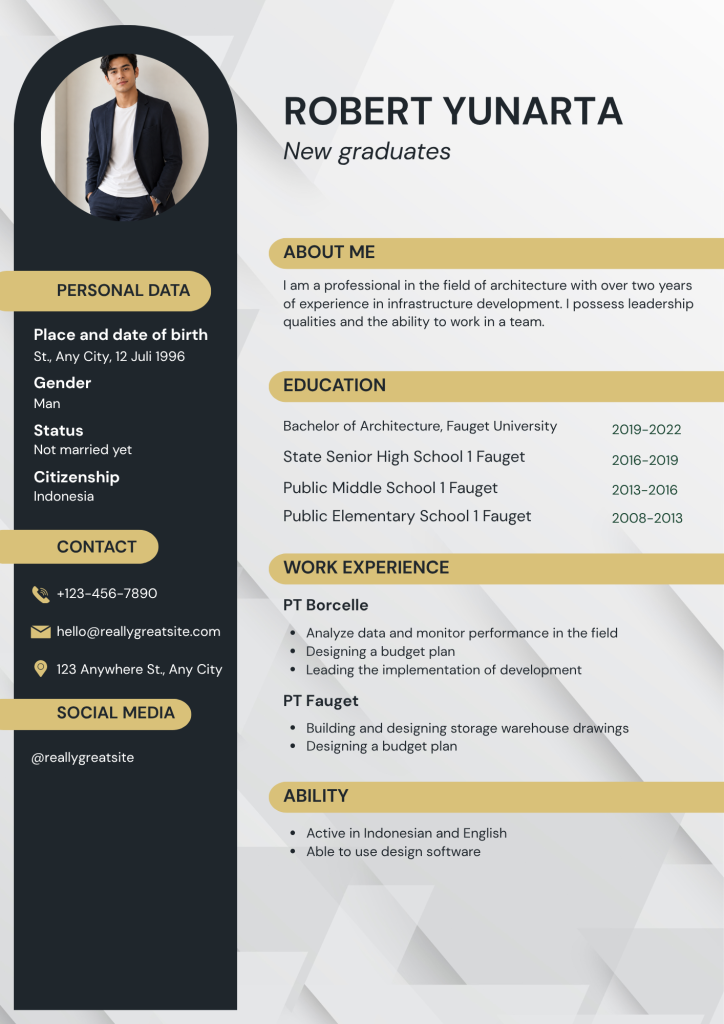
Key Sections to Include in Your Resume Template
A professional resume template should include several main sections. Each section has a specific purpose and should be written clearly.
1. Personal Data
The personal data section can include basic details such as place and date of birth, gender, marital status, and citizenship. However, you should adjust this section depending on the country and company you are applying to. In some countries, employers may not require personal details such as marital status or gender.
For local job applications, personal data may still be commonly used. But for international applications, it is often better to focus on professional information instead.
2. Contact Information
Your contact information must be correct and easy to find. Include your phone number, email, and city or general area. Use a professional email address, preferably one with your name.
Avoid using casual or funny email names. Avoid using casual or funny email names. A simple email like yourname@email.com looks more professional and trustworthy. If you have a professional social media profile, LinkedIn account, online portfolio, or personal website, you can include it in your resume. This is useful for creative fields, architecture, design, marketing, writing, and technology.
For example, an architecture applicant may include a portfolio link that shows building designs, project drawings, or previous design work.
4. About Me
The “About Me” section should be short and clear. Write two to four sentences that describe your background, experience, and strengths. This part should not be too long, as recruiters usually review resumes quickly.
A strong summary may include your field, years of experience, technical skills, teamwork abilities, and career goals. Make sure it fits the job you want.
5. Education
In the education section, list your school history from the newest to the oldest. Include the degree or school name and the year you studied. For new graduates, this section can go near the top of the resume because education is one of the strongest qualifications.
If you have relevant academic achievements, certifications, or training, you can add them here as well.
6. Work Experience
Work experience is one of the most important parts of a resume. Write your past company name, job title if you have one, and your main duties. Use bullet points to make the information easier to read.
Instead of just listing general tasks, try to show specific contributions. For example, you can say you analyzed field data, made budget plans, helped with project development, or designed warehouse drawings.
7. Skills or Ability
The skills section should show what you can do. Include both technical skills and language skills. For example, an architecture resume may list design software skills, drawing ability, project planning, communication skills, and language proficiency. Keep this section relevant. Do not add too many skills that do not relate to the job. Use a Resume Template
Using a resume template does not mean you should copy everything exactly. A template is just a layout. You still need to make the content your own. Include the name, professional title, contact details, and profile photo if the template uses one. Then update the “About Me” section to match your real experience. If you are a fresh graduate, focus on education, internships, projects, and skills. If you already have work experience, highlight your achievements and responsibilities.
You should also adjust the keywords in your resume to match the job description. For example, if the job needs project management, design software, data analysis, or communication skills, include those words naturally in your resume to make it look more relevant to the position, which may improve your chances of passing through applicant tracking systems (ATS).
Tips for Making Your Resume More Professional
First, keep your resume clean and easy to read. Do not use too many colors or fonts. Using dark colors, plain backgrounds, and simple accent colors can make the resume look nice without detracting from the content.
Second, use bullet points for your duties and achievements. Bullet points help recruiters understand your experience faster.
Third, check your grammar and spelling. Small mistakes can make your resume look careless. Read your resume several times before sending it. Then, save your resume in the right format. PDF is the best format for sending applications because it maintains a consistent design. However, keeping an editable DOCX version is also useful when you need to update your resume later.
Who Should Use This Type of Resume Template?
This resume template style is good for new graduates, junior professionals, architecture applicants, design students, administrative candidates, and anyone seeking a clean, modern resume. The two-column layout is especially helpful because it separates personal details from work information.
It is also a good choice for applicants who want their resume to look nice without being too flashy. The layout gives enough space for important details while keeping a professional look.
Final Thoughts
Choosing the best resume template can help you create a strong first impression. A well-designed template makes your resume easier to read, more organized, and more professional. It helps recruiters quickly understand your background, skills, education, and work experience.
The best resume templates are not only beautiful but also practical. They guide you in presenting your information clearly and confidently. Whether you are a new graduate or a job seeker with experience, using the right resume template can bring you one step closer to your dream job.
A resume cannot guarantee that you will get hired, but a strong resume can open the door. With the right template, clear writing, and relevant information, your job application will have a better chance of standing out in a competitive market.
Download this resume template as a PDF, or edit it directly in Canva using the editable template link.